
Google: Putting its own mail in Spam
Tuesday, November 28, 2006
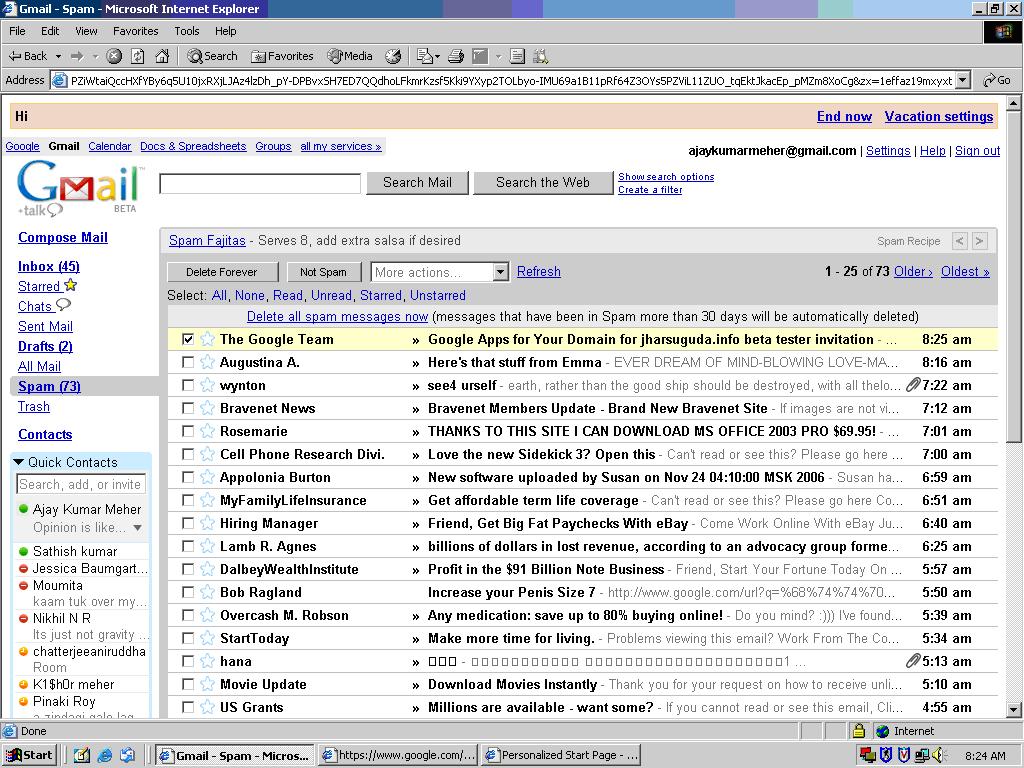
ŠŠŠŠOn the other day I signed up for Google apps for your domain. As usual I was to receive a confirmation e-mail with my log-in details in some time. I was waiting for the mail but it never reached..I thought of being deceived by google team. But no it came to me. And you know the intelligent spam filter of google put its own e-mail into the spam folder. It is quite surprised that google has designed their spam filter in such a way that it is putting their own e-mail into the spam folder. Following is an attachment for reference:
DareDevils....
ŠŠŠŠ
Hi Friends...All Devils.
On Sunday we had a get together (Devils Meet) which started with a show of Casino Royale in Innovative Multiplex and then dinner in Sahib Singh Sultan in The Forum. It was a nice hangout n we really enjoyed the aprty. You can have a glimpse of the photos here:
Dare Devils

"Goodies" with Service Pack 2?
Saturday, November 25, 2006
ŠŠŠŠNow that Microsoft has retired support for "Plain Vanilla" Windows XP (one with Service Pack 1 or just Windows XP), it has become a prerequisite to download and install Service Pack 2 just get support or even to install programs like iTunes! Hell.. all programs need SP2 to run these days.
However, after you install SP2, you will notice performance drop on your PC. There are tons of services that come enabled when you install SP2. As a result, they use up most of available memory on your computer. People having 256 or lesser will be affected the most. Most home users do not need any of these services at all!
In this article, I have provided a list of services that is not required. You can view its description in the left pane when you click on one.
Before you go ahead, let me take a moment to tell you that any issue arising from the steps below are provided to you to perform AT YOUR OWN RISK. Don't hold me responsible... Now that we have it outta our way, here we go!!!!!
To get started, click on Start -> Run -> and type "services.msc" without the quotes and hit Enter.
You will be presented with a new window. This is the Services Windows. If the status of a Service already show as "Disabled", you can leave it as it is. It is already disabled. A service that is running will show as "Automatic", one that runs when you manually enabled show as "Manual" and one that does not start at all or kept in reserve show as "Disabled".
To disable a service, just right click on a service and click on Properties. Under the "Startup type", select "Disabled" and click on OK.
1. Computer Browser:
2. Distributed Link Tracking Client:
3. Error Reporting Service
4. Help and Support
5. Indexing Service
6. Net Logon
7. NetMeeting Remote Desktop Sharing
8. Network Location Awareness (NLA)
9. Network Provisioning Service
10. Performance Logs and Alerts
11. Portable Media Serial Number Service
12. QoS RSVP
13. Remote Desktop Help Session Manager
14. Remote Registry
15. Secondary Logon
16. Security Center
17. Server
18. Smart Card
19. SSDP Discovery Service
20. System Restore Service
21. TCP/IP NetBIOS Helper
22. Themes
23. Universal Plug and Play Device Host
24. WebClient
25. Windows Time
26. WMI Performance Adapter
27. Workstation
Now restart your computer for the changes to take place.
That is all… And with that concludes my very first blog… Clap…Clap..Clap.. lol. If you want me to do a blog on how to improve your computer’s overall performance or have anything you wish to say, just drop me a comment. Happy Thanksgiving!
AOL- the grownup kid
Monday, November 06, 2006
ŠŠŠŠFor the last few days I was looking for a nice post n finally to day at this wee hour, I found something and could not stop my self from blogging it.
AOL, which was once so adamant that it was not even offering a free e-mail service..but now it boasts of offering tons of free services which includes: 1. Free e-mail service
2. Free Instant Messaging.
3. Free e-mail with customized domain
4. Local US phone number.
I will describe the 3rd and 4th parameter in detail as the other two are very common.
Free e-mail with customized domain:
--------------------------------------------
An e-mail address has two parts in the form username@domainname. Here the user name you can put according to your wish but domain name is solely provided by the service provider and it is generally the domain name of the service provider's domain. So guess how you will feel when you will be able to customize both the part of an e-mail address according the name you want. Thts exactly what AOL has started offering and it is the first initiative by any service provider. AOL has gone one step forward and started offering not only free e-mail service but you can also customized your e-mail address with a domain name you wish like you@yourdomain.com. As it has been started as a promotional base this service is only available in United States. I tried to register here but in order to validate your registration AOL will send a code as SMS to your mobile phone. So if you do not have a US mobile number you will not be able to validate your registration. But dun worry it will be very soon available worldwide.
You may bother to look at the following link:
http://free.aol.com/thenewaol/email.adp
Please check here for a complete list of FAQ :
https://domains.aol.com/personaldomain/app/domainHomeSearch
Benefits:
-----------
- Once you sign-up you can invite upto 100 people to register their e-mail address with your choosen domain.
- Huge online storage of 2 GB.
- Access your email anywhere you can get on the Internet using AOL Webmail (or IMAP access using standard email clients like Microsoft Outlook).
- With your personalized email address, you can login to the AIM® client and send/receive IMs.
Limitations:
------------
- You can customized your domain name with two TLDs (Top Level Domains) viz .com and .net
- Only available in United States.
Local US phone number:
-----------------------------
How about having a US phone number at ur possession while U r in India...yeah AOL has made it possible. A personal, local free phone number you can give out to anyone -- complete with always-on voicemail!
This service is known as AIM digit. AIM Digits are part of the FREE AIM Phoneline service. AIM Phoneline gives you a free, local telephone number that comes with always-on voicemail, delivered right to your email box. On top of that, when you're online, it lets you screen and answer calls, using your PC microphone and speakers. It's a completely free Internet Phone Service.
Now I boast of owning a US telephone number while being here in India and you can also be one to have it. Visit the following link to sign-up for a free phone number:
http://www.aimphoneline.com/index.adp?promo=778964&page=welcome
Check List:
-----------
I guess this service is again meant for people from United States as during registration it will ask for Zip code and you have to provide a 5 digit valid US zip code.
In the next post I will tell about another great free service from AOL so watch out this space...
Have some fun
Thursday, October 26, 2006
ŠŠŠŠHi, After a long gap this is a new post from me.
This is regarding some updates in the blog..
I have added a game tic-tac-toe in the side bar to have some fun while reading my blog.
As all of you must be aware of the new 7 wonders of the world campaign..I have also put a link to vote for the new 7 wonders of the world. You can click on it(present on the sidebar) to cast your vote for the 7 wonders of the world and be a part of the official campaign.
You can also vote directly from here:
Thanks
Ajay M

Section "49-O"--Indian Constitution...A brief Idea.
Friday, September 08, 2006
ŠŠŠŠHave you ever come across the term "49-O"?????? The answer is abig NO from the masses...
As per the 1969 act, in section "49-O" it states that A person can go to the polling booth, confirm his identity, get his finger marked and convey the presiding election officer that he doesn't want to vote anyone! Yes such a feature is available to Indian citizen, but has not been disclosed to the general public by our seemingly notorious leaders.
The motive behind this "49-O" is you can say "I VOTE NOBODY"... because, in a ward, if a candidate wins, say by 123 votes, and that particular ward has received "49-O" votes more than 123, then that polling will be cancelled and will have to be re-polled. Not only that, but the candidature of thecontestants will be removed and they cannot contest the re-polling, sincepeople had already expressed their decision on them. This would bring fear into parties and hence look for genuinecandidates for their parties for election. This would change the way, of our whole political system...only if people are aware of it.
It is seemingly surprising why the electioncommission has not revealed such a feature to the public....Please spread this news to as many as you know... Seems to be awonderful weapon against corrupt parties in India... show your power,expressing your desire not to vote for anybody, is even more powerful than voting... so don't miss your chance. So either vote, or vote not to vote (vote 49-O) and pass this infoon..."Please pass this information to as many as possible, so that we, the people of India, can really use this power to save our nation"
Use your voting right for a better INDIA. Jai Hind....
Release of 2007 Office System Beta 2 Technical Refresh
Thursday, September 07, 2006
ŠŠŠŠMicrosft has released 2007 Microsoft Office system Beta 2 Technical Refresh (B2TR) for Microsoft internal use. This means this beta system will be available to all Microsoft employees 7 days before the public release.
The public release of B2TR will not be announced publicly by Microsoft until 14 september. This b2TR promise to remove all those bugs present in Beta 1 and give the user a fast hand experience of Office 2007 final release. The final release date of the full version has not yet been disclosed by Microsoft.
Apart from this Windows Vista Rc1 has already been released for MSDN and Technet subscribers. And for those who participated in Vista Beta Customer preview Program (CPP).
Browse Faster With FireFox
Wednesday, September 06, 2006
ŠŠŠŠ
Have you lately started using Firefox...If not I suggest you to get Firefox and you will really enjoy with the ease of use and loads of customization available..
If you are using broadband connection and using Firefox then follow the simple steps provided below to make your Firefox work faster for you:
The catch here is by enabling pipelining in Firefox you can tell your browser to make several request at the same time, which means the site will load faster.
1.Type "about:config" into the address bar and press Enter. Scroll down and look for the following entries:
- network.http.pipelining
- network.http.pipelining.maxrequests
- network.http.proxy.pipelining
2. Alter the entries as follows:
Set "network.http.pipelining" to "true"
Set "network.http.proxy.pipelining" to "true"
You can do so by double clicking on the row where the tags are present, so it will change to true/false alternately.
Set "network.http.pipelining.maxrequests" to some number like 30. This means it will make 30 requests at once.
3. Lastly right-click anywhere and select New-> Integer. Name it "nglayout.initialpaint.delay" and set its value to "0". This value is the amount of time the browser waits before it acts on information it recieves.
If you have any doubts submit in the comments section.....Enjoy browsing at a faster speed.
